
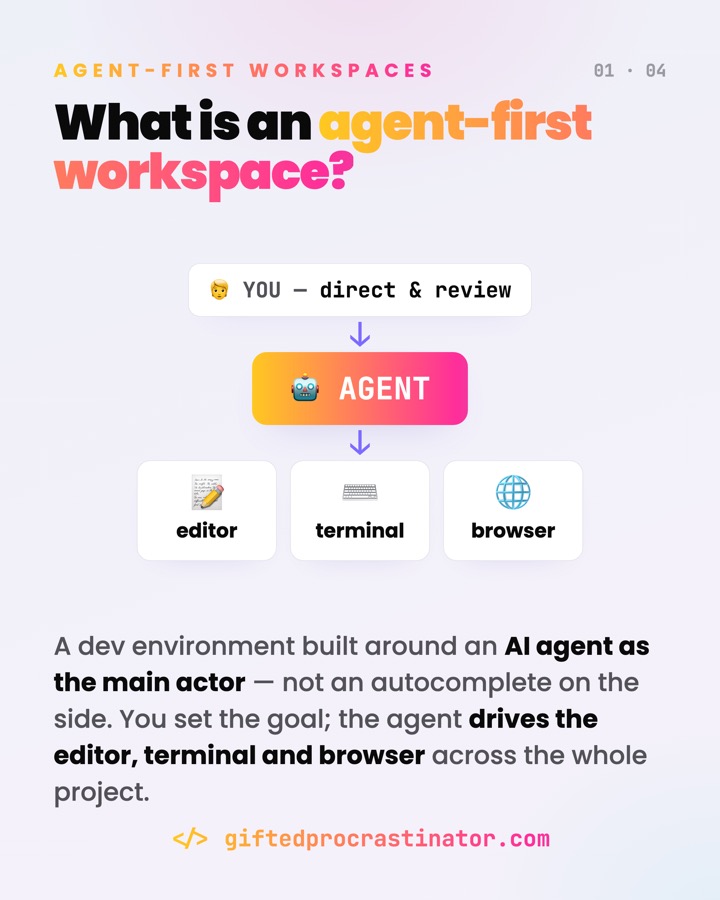
An agent-first workspace is a dev environment built around an AI agent as the main actor — not an autocomplete bolted onto your editor. You set the goal; the agent drives the editor, terminal and browser across the whole project, and you step in to direct and review.
Where you meet it
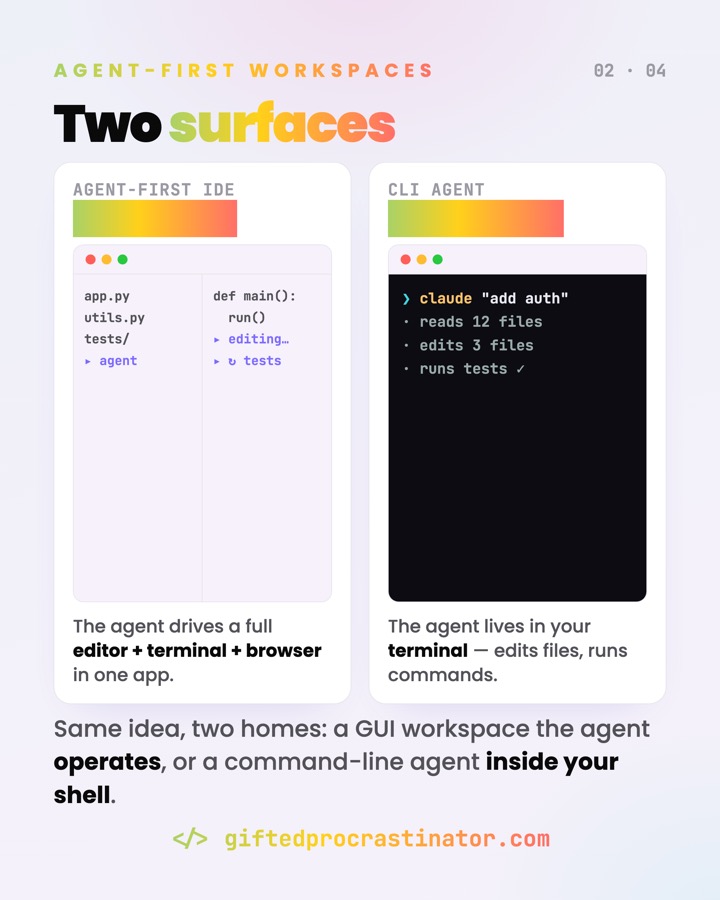
- CLI coding agents in a repo —
claude "add auth", which then reads files, edits, and runs the tests itself. - Agent-first IDEs where the agent operates a full editor + terminal + browser in one app.
- Computer use — the agent takes screenshots and moves the mouse and keyboard to drive any desktop app.
- CI and scheduled runs: an agent reviews a PR or triages an issue without a human at the keyboard.
What it does
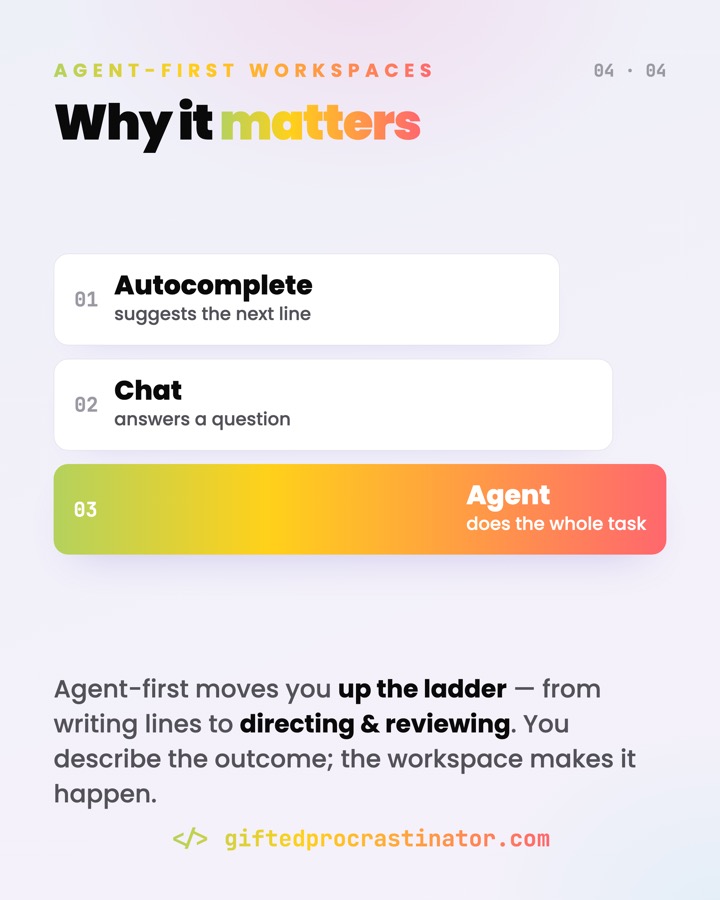
It moves you up the ladder — from writing lines (autocomplete) to asking questions (chat) to handing over a whole task (agent). You describe the outcome; the workspace plans the steps, takes the actions, and reports back. The catch is that those actions are real: files get written, commands get run, PRs get opened.
The agent's actions are real: files get written, commands run, PRs open. Autonomy you didn't sandbox is blast radius you didn't measure.
How it works
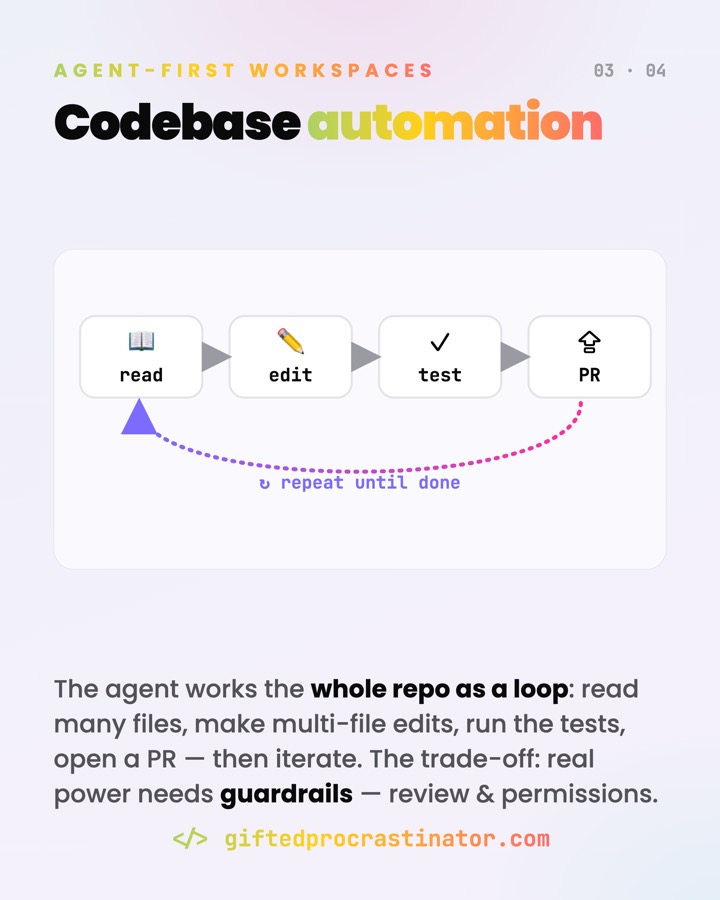
The agent gets three things: tools (terminal, filesystem, a browser or computer-use surface), a sandbox to act in, and a feedback loop with you — plan, act, review, repeat. On a codebase that loop looks like:
read    →  pull in many files for context
edit    →  make multi-file changes
test    →  run the suite, read the output
PR      →  open a pull request
↻ repeat until the goal is met
Each step is a tool call the model chooses; risky ones can pause for your approval before they run. The agent is the augmented LLM from "building effective agents" — an LLM with tools and memory — given an environment designed for it instead of for a human.
Watch out
- Blast radius. The agent runs real actions on your machine and repo. Put it in a sandbox with filesystem and network limits, and keep a human in the loop for risky steps (deletes, pushes, money, prod).
- Prompt injection. A file, a web page, or a tool result can carry hidden instructions. Don't pipe untrusted content straight in; isolate web fetches and require approval for network commands.
- Auditability. Because the agent acts on its own, you need a trail — review diffs, log commands, scope credentials so one leak has a small blast radius.
- Autonomy vs control. More autonomy means fewer prompts but less oversight. Start with permissions on; widen the sandbox only where you've decided it's safe.
Go deeper
- Claude Code — overview of an agentic coding tool (terminal, IDE, web)
- Anthropic — Building Effective AI Agents (agents, tools & the agent-computer interface)
- Anthropic — Computer use tool (screenshots + mouse/keyboard control)
- Claude Code — sandboxed Bash tool (filesystem & network isolation)
- Claude Code — security, permissions & prompt-injection safeguards
Ein Agent-First-Workspace ist eine Dev-Umgebung rund um einen KI-Agenten als Hauptakteur — kein Autocomplete am Rand deines Editors. Du gibst das Ziel vor; der Agent steuert Editor, Terminal und Browser über das ganze Projekt, und du steuerst und prüfst.
Wo es vorkommt
- CLI-Coding-Agenten im Repo —
claude "add auth", der dann selbst Dateien liest, ändert und die Tests laufen lässt. - Agent-First-IDEs, in denen der Agent einen vollen Editor + Terminal + Browser in einer App bedient.
- Computer-Use — der Agent macht Screenshots und bewegt Maus und Tastatur, um beliebige Desktop-Apps zu steuern.
- CI und geplante Läufe: ein Agent reviewt einen PR oder triagt ein Issue, ohne dass jemand an der Tastatur sitzt.
Was es tut
Es hebt dich die Leiter hoch — vom Zeilen-Tippen (Autocomplete) über Fragen stellen (Chat) bis zum Übergeben einer ganzen Aufgabe (Agent). Du beschreibst das Ergebnis; der Workspace plant die Schritte, führt die Aktionen aus und meldet zurück. Der Haken: diese Aktionen sind echt — Dateien werden geschrieben, Befehle laufen, PRs werden geöffnet.
Die Aktionen des Agenten sind echt: Dateien werden geschrieben, Befehle laufen, PRs öffnen. Ungesandboxte Autonomie ist ungemessener Blast-Radius.
Wie es funktioniert
Der Agent bekommt drei Dinge: Werkzeuge (Terminal, Dateisystem, einen Browser bzw. eine Computer-Use-Oberfläche), eine Sandbox zum Handeln und eine Feedback-Schleife mit dir — Plan, Aktion, Review, wiederholen. Auf einer Codebase sieht der Loop so aus:
lesen   →  viele Dateien als Kontext einlesen
ändern  →  Änderungen über mehrere Dateien
testen  →  die Suite laufen lassen, Output lesen
PR      →  einen Pull Request öffnen
↻ wiederholen, bis das Ziel erreicht ist
Jeder Schritt ist ein Tool-Call, den das Modell wählt; riskante können vor der Ausführung auf deine Freigabe warten. Der Agent ist der „augmented LLM" aus „building effective agents" — ein LLM mit Werkzeugen und Gedächtnis — in einer Umgebung, die für ihn statt nur für Menschen gebaut ist.
Worauf achten
- Blast-Radius. Der Agent führt echte Aktionen auf deiner Maschine und im Repo aus. Steck ihn in eine Sandbox mit Datei- und Netz-Grenzen und halte für riskante Schritte einen Menschen in der Schleife (Löschen, Push, Geld, Prod).
- Prompt-Injection. Eine Datei, eine Webseite oder ein Tool-Ergebnis kann versteckte Anweisungen tragen. Leite ungeprüften Inhalt nicht direkt rein; isoliere Web-Fetches und verlange Freigabe für Netz-Befehle.
- Nachvollziehbarkeit. Weil der Agent eigenständig handelt, brauchst du eine Spur — Diffs reviewen, Befehle loggen, Credentials eng scopen, damit ein Leak einen kleinen Blast-Radius hat.
- Autonomie vs. Kontrolle. Mehr Autonomie heißt weniger Nachfragen, aber weniger Aufsicht. Starte mit aktiven Permissions; weite die Sandbox nur dort, wo du es bewusst für sicher hältst.
Mehr dazu
- Claude Code — Überblick über ein agentisches Coding-Tool (Terminal, IDE, Web)
- Anthropic — Building Effective AI Agents (Agenten, Werkzeuge & das Agent-Computer-Interface)
- Anthropic — Computer use tool (Screenshots + Maus-/Tastatursteuerung)
- Claude Code — sandboxed Bash tool (Datei- & Netz-Isolation)
- Claude Code — Security, Permissions & Schutz vor Prompt-Injection